SpendApp: rolling my own Splitwise
I recently had a great trip with the family, and we used Splitwise. I chose it over alternatives I'd used before because I remember being bothered by their lack of usabilty and features.
Sadly, when we used Splitwise this time, I immediately remembered why I tried those alternatives in the first place.
While it's a very polished app, it's also very monetized. The most annoying reminder of that is the limit of 4 expenses a day per account, before you're told you have to buy Splitwise Pro for 4€ a month.
Luckily or unluckily, we now live in LLM times, and everybody can make their own apps for everything (again, luckily or unluckily).
The first version cost me about 4€ to build on the Claude subscription Plan. Suddenly, the value proposition of Splitwise Pro seems pretty weak.
At some point I decided that it might as well be pubic, which means GDPR compliance, and so:
Everything's Encrypted E2E
Not wanting the headache of storing financial data of users, I decided to encrypt pretty much everything*.
This compounded with my idea that users should be able to join groups for only some amount of time, and only see expenses for that timespan. I don't know if anyone asked for this, but there it is.
For the encryption scheme, the end result is basically: every entry needs its own key.
The overall structure now looks like this:
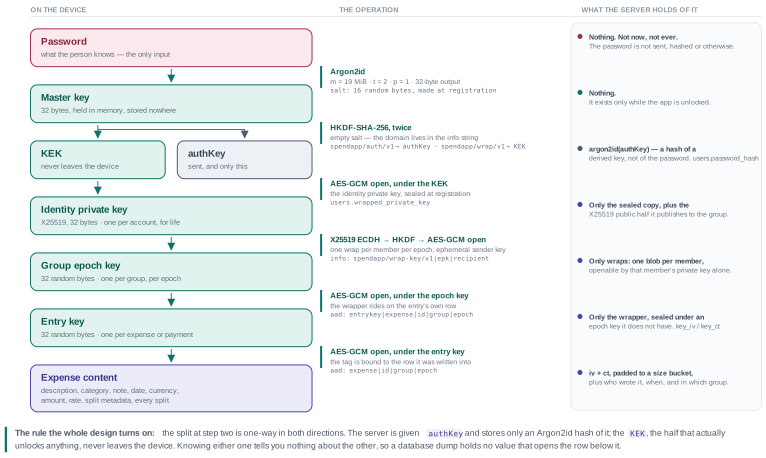
I won't get into more details because, frankly, I'd be regurgitating what the LLM told me, and the interested reader can run their own on the repo.
But I wanna point out some consequences for the app:
On the plus side, everything is on the client, and everything derives from the user's password.
The server can't read any user data, beyond the username and the number of groups/expenses.
Less positive: while the user can change their password, there is, by design, no recovery mechanism.
The expenses are encrypted with keys derived from the password, and there's no way to undo that without adding another trusted entity to hold keys.
Another downside of a blind server is that if you're using the feature that not everyone in the group sees everything, clients that don't have the entire history can't calculate optimal payments (they still see how much they owe, of course) .
Feature Faves
Beyond what you'd expect from an expense sharing app, these little features are my favorites that Splitwise doesn't do:
- Different splitting modes are linked (e.g. percent to absolute).
In Splitwise, adding absolute numbers is completely disconnected from the percentage. In SpendApp, I can enter 4€ for my coffee, 6€ for my friend's, switch to the percentage tab and it will already show 40/60.
If I now change the total to add a tip, those percentages automatically apply. I can read the split off the receipt without calculating percentages, and still apply the tip (or tax!) evenly, a use case I personally encounter very often. - Auto-filling parts when the sum is entered, and auto-filling the sum when the parts are entered.
When I enter 10€ as the total, I can just fill in 4€ for myself, the other 6€ are filled for me.
If I enter 4€ for me and 6€ for my friend, the sum is auto filled, and the app won't force me to go back 2 screens to fill it in (like a certain other app).
Combined with the percentages, entering a non-equal expense is significantly faster for my typical use case. - Every expense setting on one screen.
Some might see this negatively as the most simple use case (1 payer, split equally between everyone) is not as clean. However, I often find myself using uneven splits though, and Splitwise makes it an absolute chore with it's several sub menus. - Stats! Just some graphs about who spent how much, who consumed how much etc. Splitwise has this in some form, but it's once again paywalled.
- Temporary Group Members.
You might start a group when you want to enter the first expense, but not everyone can join right in that moment for whatever reason.
SpendApp allows you to create temporary group members you can assign expenses to. When people join later, they can claim one of those temporary members' entries as their own.
You can even be entirely offline from group creation to adding an expense with temporary members.
The code is on GitHub and the app itself is live at spend.giner.cc.